
⌘
Understand existing projects
Read topology, rooms, devices, group addresses and links in a structured way – without exports or stale copies.
KNX-MCP connects the open ETS project to your AI assistant through MCP. Devices, group addresses, parameters, building structure and bus data become available where you already work – directly in ETS.
Currently available free of charge in the KNX Online Shop.

The live monitor shows connected clients, tool calls and telegram activity. Permissions can be set per tool to allowed, confirmation required or blocked.
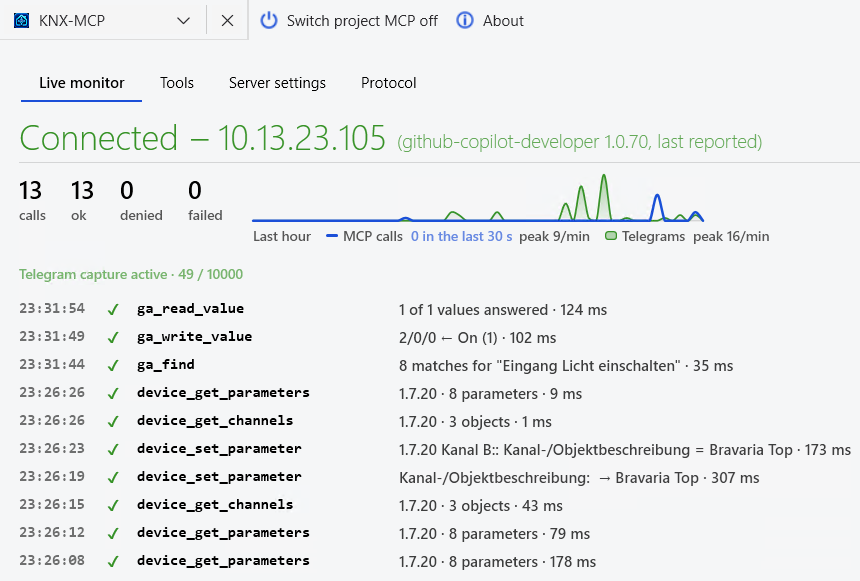
The assistant works with the current open ETS project. By default the MCP endpoint stays on localhost.
Default binding is 127.0.0.1; network access must be enabled deliberately and protected with an access key.
From understanding an unfamiliar project to commissioning and troubleshooting.
Read topology, rooms, devices, group addresses and links in a structured way – without exports or stale copies.
Collect missing datapoint types, unlinked objects, unusual sender/receiver structures and other findings.
Add rooms, functions and group addresses following the existing scheme and link communication objects.
Listen to bus traffic, read current values, send values intentionally, identify devices and scan lines.
Read, add and complete ETS to-do items and evaluate them together with project history.
Compile room, device and address information from the actual project for maintenance and acceptance.
KNX-MCP searches by room, trade, name, datapoint type and ETS function – including synonyms, umlauts and common spelling variants.
Reading works immediately. Changes, telegrams and device programming are controlled separately.

KNX-MCP does not operate a cloud service your project data passes through. The app works inside ETS; you decide which assistant processes the data. A locally hosted model is possible as well.
The app does not send project data to a Gerald Docenko server. The local log remains on your computer.
Project and contract numbers are only returned on explicit request; security keys are never returned.
ETS5 and ETS6 can expose several open projects through one endpoint; several MCP clients can be connected at the same time.
The KNX-MCP Community repository brings together discussions, bug reports, ideas, setup examples and release notes. Please never publish project files, credentials or customer data there.
Ask questions, discuss solutions and share useful workflows with other users.
Open Discussions ↗Report reproducible problems and technical defects as GitHub Issues – without confidential project or customer data.
Open Issues ↗Install KNX-MCP, enable Project MCP and connect an MCP-compatible assistant.
Open guide ↗Changes and notes for the published version 1.1.0.0 (Release 1).
Open Release Notes ↗For ETS5 and ETS6. KNX-MCP is currently available free of charge in the KNX Online Shop. Questions, bug reports, ideas and documentation are handled in the public GitHub community.
